Conversion Rate: What It Is and How to Calculate It
Define the action. Name the denominator. Read count and rate together.
On this page
Conversion rate measures a defined action relative to eligible opportunities. For a rate that counts each opportunity at most once, it is the percentage of those opportunities that produce the action: a purchase, enquiry, booking, signup or another outcome that matters to the business.
The metric is useful only when the action and the denominator are clear. A purchase rate based on website sessions answers a different question from a lead-to-customer rate based on qualified leads. Some platforms count multiple conversion events per opportunity instead, so always check the counting rule.
What is conversion rate?
For an opportunity-share measure, use:
Conversion rate = converting opportunities / eligible opportunities x 100
A converting opportunity is one eligible unit that completes the chosen action. Count that unit at most once, even if it completes the action repeatedly. The denominator might be sessions, users or qualified leads, depending on the question. The numerator must be a subset of that same group.
For example, a session-based enquiry rate counts sessions with at least one completed enquiry, not every enquiry submitted. A person can have several sessions; sessions are not unique people.

Visual reference. Each converting session makes exactly one completed request in this teaching example, so 16 more converting sessions also means 16 more requests. The rate falls by 1.6 percentage points, or 20% relative to June's 8%. All figures are hypothetical. These monthly totals do not establish causes, statistical significance or profitability. Multiple-action-per-interaction advertising metrics follow different counting rules.
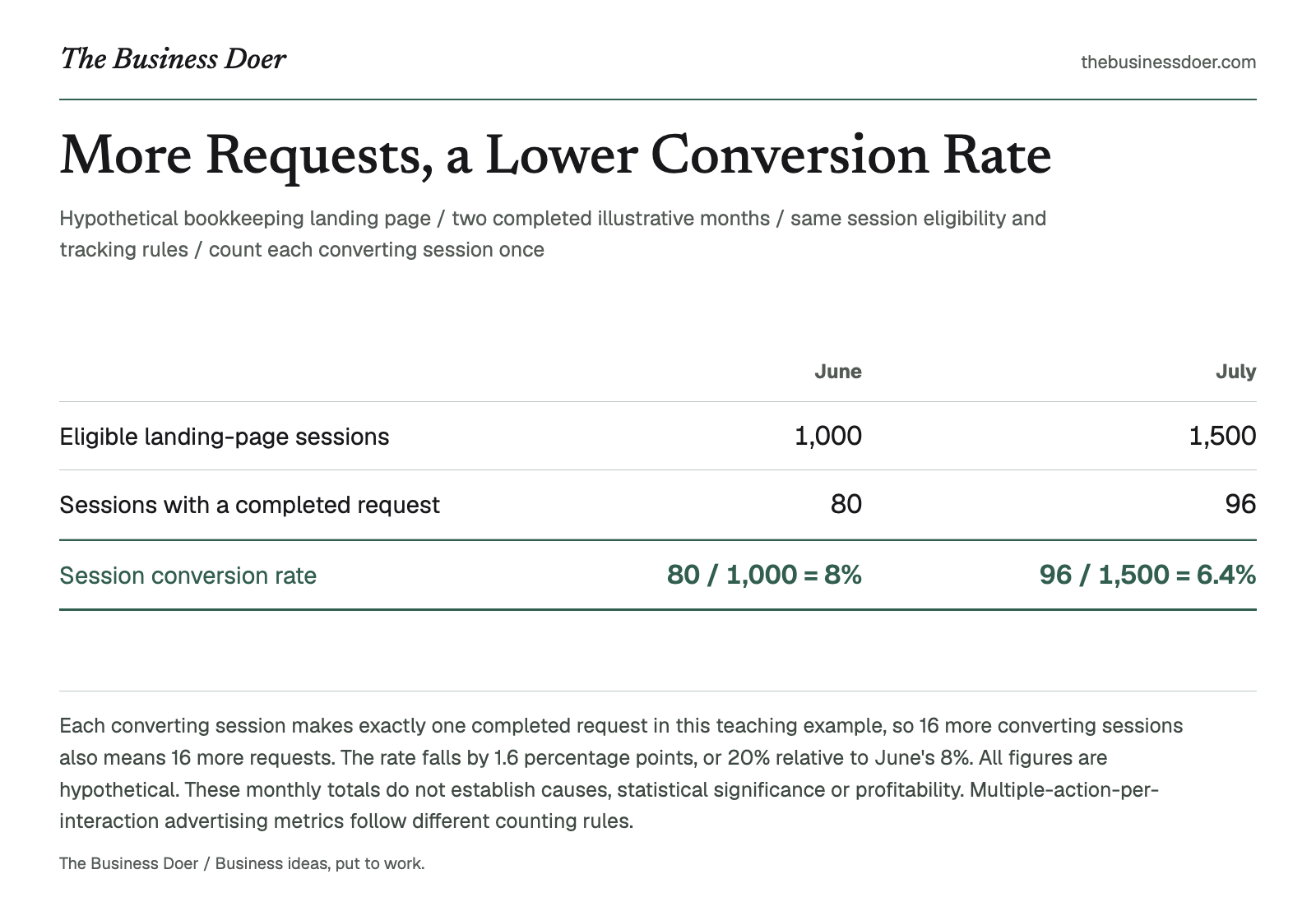
Text version
Hypothetical bookkeeping landing page / two completed illustrative months / same session eligibility and tracking rules / count each converting session once
- Eligible landing-page sessions
- June: 1,000; July: 1,500
- Sessions with a completed request
- June: 80; July: 96
- Session conversion rate
- June: 80 / 1,000 = 8%; July: 96 / 1,500 = 6.4%
Similar metric names can hide different calculations:
| Measure | Numerator and denominator |
|---|---|
| Google Ads conversion rate | Counted conversions divided by eligible ad interactions. Multiple actions or the "Every" counting setting can produce more than one conversion per interaction, so the reported rate can exceed 100%. It is not necessarily a share of people. |
| Google Analytics session key event rate | Sessions with a key event divided by total sessions. |
| Google Analytics user key event rate | Users with a key event divided by total users. |
| Shopify online-store conversion rate | Sessions with a purchase divided by total sessions, rather than the number of orders divided by sessions. |
The example and measurement card below use one action, one eligible unit and at most one conversion per unit. They do not reproduce a multiple-event-per-interaction metric.
Why does it matter?
Conversion rate helps a business compare outcomes relative to opportunity. It can show whether more traffic or leads are producing proportionate results, compare the same action across periods or channels, and reveal when the number of converting opportunities rises while the rate falls.
Keep the action, denominator, eligibility rules and observation window comparable. The percentage alone does not measure the value or profitability of the outcome.
How to calculate conversion rate
1. Define one conversion
Choose the exact action. "Engagement" is too vague. "Completed consultation request" or "completed purchase" is observable. For an opportunity-share rate, specify how repeated actions are deduplicated within each eligible unit.
2. Choose the eligible denominator
Use the group that had the opportunity to convert. Name the unit and the inclusion rules: for example, eligible sessions on one consultation landing page, excluding internal test traffic under a consistent rule.
Do not switch between sessions, users and leads while calling the result the same rate. Use a data source that can identify which eligible units completed the action. Raw repeated requests are not a substitute for converting sessions.
3. Use a compatible time window
Define both the reporting period and how long the action can take. If the action must happen during a session, wait until the relevant sessions have ended and the reporting data has settled. If following a lead cohort for 30 days, give every eligible lead that full window before comparing results.
Separate monthly session groups can be compared under the same definitions; they do not need to be the same cohort. A cohort analysis, by contrast, follows a defined group through its observation window.
4. Divide and interpret
Divide converting opportunities by eligible opportunities and multiply by 100. With zero eligible opportunities, the rate is undefined, not 0%. Zero converting opportunities out of a positive denominator gives 0%. A positive converting count with a zero denominator cannot be a valid subset.
A simple example
Hypothetical example: A small bookkeeping firm uses a landing page to generate consultation requests. These are invented teaching inputs, not observed campaign results or benchmarks.

A fictional bookkeeping consultation illustrates the action the landing page offers. This generated scene is not a real request, client meeting or evidence of conversion performance.
Both months measure eligible sessions on the same landing page with at least one completed consultation request during that session. Count each converting session once. Assume, only for this illustration, that each converting session produces exactly one completed request, giving 80 and 96 requests respectively. The rate still counts converting sessions, not raw requests, unique users or leads.
| Measure | June | July |
|---|---|---|
| Eligible landing-page sessions | 1,000 | 1,500 |
| Sessions with at least one completed request | 80 | 96 |
| Calculation | 80 / 1,000 x 100 | 96 / 1,500 x 100 |
| Conversion rate | 8% | 6.4% |
Use the same action, session eligibility, counting rules and landing-page scope in both months, after each month's sessions and reporting window have matured. These are separate monthly session groups, not the same cohort followed across months.
July has 16 more converting sessions, a 20% increase in the count: (96 - 80) / 80 x 100. Yet a smaller share of eligible sessions converts.
The rate change is 6.4% - 8% = -1.6 percentage points. The relative rate change is (6.4% - 8%) / 8% x 100 = -20%. Percentage points subtract the rates; relative change divides that difference by the earlier rate. If the earlier rate is zero, relative rate change is undefined.
The comparison does not show what caused the change. A different traffic mix, offer or tracking method could be relevant; each is a hypothesis to investigate. The example is not an experiment or a test of statistical significance. More requests also do not establish more value or profit.
When should you use it?
Use conversion rate when there is a clearly defined action and a meaningful group that had the opportunity to take it: sessions with purchases, sessions with enquiries, trials becoming paid accounts or qualified leads becoming customers.
A Marketing Funnel helps place actions within a broader customer journey. A Sales Funnel can define the transitions toward a sale. For distinct lifecycle stages, the AARRR Funnel helps separate activation, retention, referral and revenue measures.
If the action is a response to one persuasive message, the AIDA Model can help structure that message before evaluating the chosen outcome.
How should you interpret the result?
For the opportunity-share measure, a higher rate means a larger share of the chosen denominator completed the action. It does not automatically mean the business is performing better overall.
Review the rate alongside the converting count, audience or lead quality, value created, costs and tracking changes. A 7% purchase rate among qualified returning visitors is not directly comparable with a 3% rate among all first-time visitors.
Check measurement changes before interpreting behavior. Changes to session identification, event definitions, filters or reporting rules can change the measured rate even if customer behavior has not changed. Comparable definitions are a prerequisite for interpretation, not proof of a cause.
Common confusion: conversion rate vs. conversions
Conversion counts report how many outcomes were counted under a stated rule. An opportunity-share conversion rate reports the share of eligible units with the action. Repeated actions can make a raw event count different from the number of converting units.
The bookkeeping example has more converting sessions and a lower rate. Review both. Neither gives the value of a request or establishes whether the business is profitable.
Conversion rate is also not automatically click-through rate. Click-through rate measures clicks relative to the relevant exposure base, while the conversion measure must name its chosen action and opportunity base.
Common mistakes
- Using an unclear action. Define one observable outcome.
- Using the wrong denominator. Match it to the business question and name its unit.
- Mixing users, sessions and events. One person can generate several sessions and repeated actions.
- Comparing changed definitions or incomplete windows. Check eligibility, scope, counting rules, source and observation timing.
- Treating a rate as a diagnosis. It describes a result; traffic mix and offer changes need separate investigation.
- Ignoring counts and value. A lower rate can accompany more converting opportunities; neither guarantees profit.
- Treating every platform rate as an opportunity share. A multiple-event ratio can legitimately exceed 100%; that is a different counting model.
Limitations
Conversion rate compresses behavior into one percentage. It does not show why people acted, the value of each outcome or whether acquisition is profitable. A small number of opportunities can produce large swings; a period comparison alone supplies neither causal attribution nor statistical significance.
Tracking gaps, changed measurement rules and unmatched numerator and denominator groups can undermine a comparison. Record unknown counts as unknown rather than guessing zero. A fully observed period with zero opportunities is a valid record of no opportunities, but its rate remains undefined.
Quick checklist
Put it to work: build a measurement card in 20 minutes
- Choose the action: 3 minutes. Write the exact completed event that matters to the business.
- Define the denominator: 4 minutes. Name the eligible unit, inclusion rules and scope. State how each unit is counted once.
- Set the window and source: 4 minutes. Choose a completed period and a mature observation window; record the source and counting method.
- Calculate: 3 minutes. Record eligible and converting counts, then calculate the rate when the denominator is positive.
- Compare if useful: 3 minutes. Add a previous period only when definitions are compatible. Review count change, percentage-point change and relative rate change separately.
- Write the next question: 3 minutes. State one supported observation and one unanswered question without guessing the cause.
| Measurement-card field | What to record |
|---|---|
| Action | The exact completed event, such as a consultation request. |
| Eligible denominator | Sessions, users or leads, with explicit inclusion and exclusion rules. |
| Scope and window | Page, offer or sales stage; period labels; action window and maturity cutoff. |
| Source and counting rule | Where the counts came from and how converting units are deduplicated. |
| Current period | Eligible count, converting count and rate, or an undefined rate when there are no opportunities. |
| Previous period, if used | The same fields under compatible definitions, with changes stated separately. |
| Observation | A result supported by the counts, such as more converting sessions but a lower rate. |
| Next question | Evidence to investigate, such as whether the traffic mix or tracking rules changed. |
Before acting, review whether the definitions or tracking changed and whether count or value moved with the rate. A completed card records your review of comparability; it does not independently verify the source data. Finish with a specific observation and question, not merely "increase conversion rate."
This card measures the share of eligible opportunities with at least one defined action. Count each converting session, user or lead once. It does not reproduce advertising reports that sum repeat actions per interaction and can exceed 100%.
No measurement card yet. Record the action, eligible counts, evidence and interpretation, then confirm your review. Blank is not zero; completed zero-opportunity periods have an undefined rate.
Review incomplete entries (11)
- Current: Eligible opportunities: Enter 0 to 1,000,000,000 whole opportunities, without separators, signs or decimals. Blank is not zero.
- Current: Converting opportunities: Enter 0 to 1,000,000,000 whole opportunities, without separators, signs or decimals. Blank is not zero.
- Review the counting unit, one-count rule, compatible periods and completed observation windows before calculating.
- Record the business or audience scope.
- Record the exact conversion event and one-count rule.
- Record the eligible denominator definition.
- Record the observation and attribution window.
- Record the data evidence and tracking limits.
- Record the current period or cohort.
- Record the supported observation.
- Record the next evidence question.
Key takeaways
- Define the action, eligible unit and counting rule before calculating a rate.
- For an opportunity share, count each converting unit at most once within its eligible group.
- Sessions, users, leads and ad interactions are not interchangeable denominators.
- More converting opportunities can accompany a lower conversion rate: June's 8% becomes July's 6.4% while the converting count rises from 80 to 96.
- Percentage-point change and relative rate change answer different questions.
- A rate identifies a result to investigate; it does not establish cause, value or profit.
Final takeaway
Conversion rate is a useful ratio when you can see exactly what counted, which opportunities were eligible and how long they had to act.
Name the action and denominator, preserve comparable measurement rules, and read the rate beside the count and value. Then use the result to choose the next evidence question.